A calorie tracker that keeps your food log on your phone.
Counter44 works out a daily calorie and macro target, then lets you log meals from 7,200+ built-in foods. Track water, exercise, weight and a daily progress photo alongside, with no account and no ads.
Calories. Macros. Done.
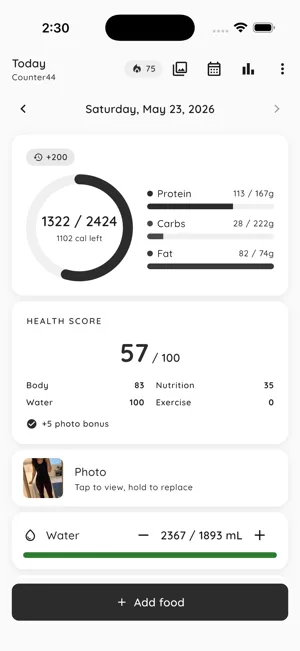
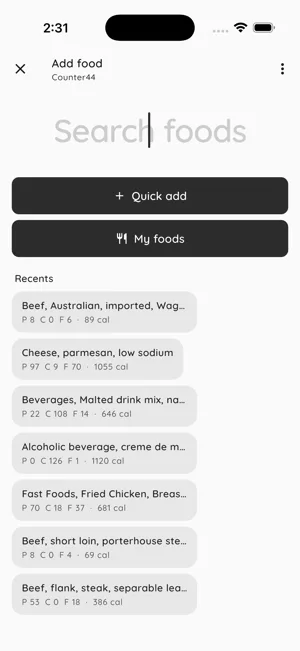
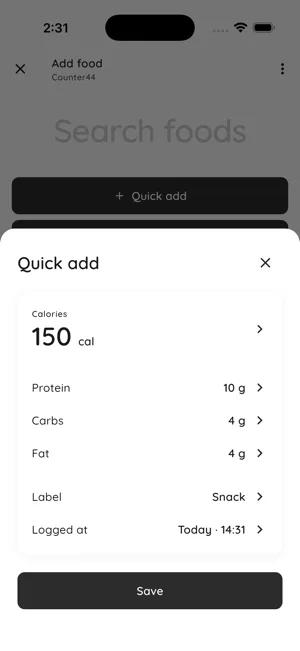
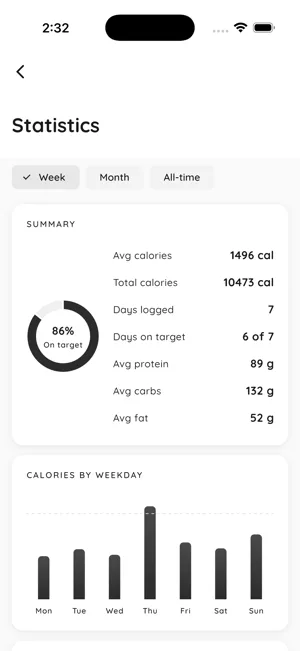
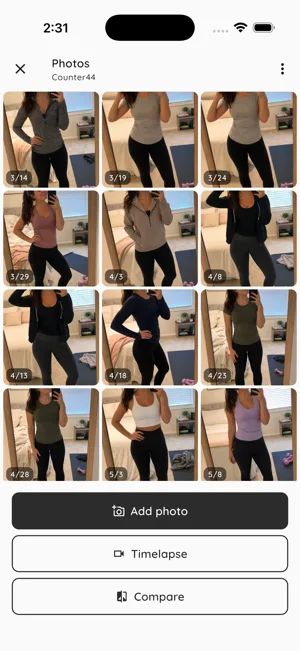
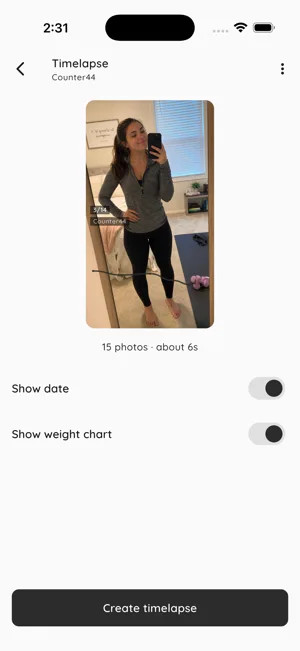
Six screens from the app: the Today ring, food search, Quick Add, weekly stats (Pro), the photo-a-day gallery and the timelapse export.
Set a target once.
Then just log.
A guided setup works out your numbers. After that, each meal is a search and a tap, and the Today screen keeps the running total.
Set your target
Answer questions about your sex, age, height, weight, activity and goal. Counter44 works out a daily calorie target and a protein, carb and fat split, and you can change either later.
Log what you eat
Search 7,200+ foods and log a portion in grams, milliliters or a named serving like 1 cup. For a meal the database doesn't cover, Quick Add takes calories and macros you type in.
See where the day stands
The Today screen shows the calories you have left, protein, carbs and fat against target, water, exercise and a Health Score, with each entry filed under the time you logged it.
Where your calorie target comes from.
Counter44 starts with your basal metabolic rate, the energy your body uses at rest, calculated with the Mifflin-St Jeor equation from your sex, age, height and weight. It multiplies that by an activity factor, from 1.2 for mostly sitting to 1.725 for very active days, to estimate what you burn in a day. To lose weight it subtracts 500 kcal, to gain it adds 300, and to maintain it leaves the number as it is.
The target never drops below 1,200 kcal for women, 1,500 for men, or 1,350 if you choose not to say. Macros start at 30% protein, 40% carbs and 30% fat, turned into grams at 4, 4 and 9 kcal per gram, and you can type your own numbers over any of it. It's an estimate to start from, not medical advice: if you're pregnant, under 18 or managing a health condition, set your target with a doctor or dietitian.
Get your number and start logging in Counter44 — free on iOS & Android →
Fast logging, real privacy, daily proof.
Everything below is in the free version. Pro adds the Statistics tab, 90-day and 365-day weight trends, more than three meal reminders and the rest of the 30+ themes, with a 7-day free trial.
A food database that works offline
About 7,200 USDA-derived foods ship inside the app, so search works with no connection. Log by grams, milliliters or a named serving, and save your own foods from a nutrition label, as many as you like.
One screen for the whole day
A calorie ring, macro bars, water and exercise cards, and your entries grouped into morning, midday, evening and late. Swipe back a day to fill in a meal you forgot.
A daily Health Score
Nutrition, body, water and exercise blended into one number out of 100. One bad macro can't hide behind two good ones, and a day with nothing logged shows a dash, not a zero. It's a nudge, not a medical reading.
A photo a day, made into a video
Take one progress photo a day and Counter44 turns the run into a 1080×1920 timelapse, with your weight chart along the bottom if you want it. Save it to your photos or share it.
Streaks, badges and reminders
Streak badges at 3, 7, 14, 30, 60, 100 and 365 days of logging, meal reminders at the times you pick, and an optional evening nudge when you haven't logged anything yet.
Nobody else reads it
No account, no sign-up, no ads. Your food log, weight, water, exercise and photos stay on your phone. The app sends anonymous crash and usage stats, never your entries.
More apps for the
way you actually live.
Counter44 is part of a small lineup of single-purpose apps. All free to download. No accounts. No ads.
Reset75
A 75-day challenge with a list of daily tasks, like following a diet, drinking your water and taking a progress photo. Counter44 covers the food side.
30 Day Challenge
Pick one habit, like a daily walk or cooking at home, and log it for 30 days, with streaks and a photo timelapse of the month.
Alcohol Free Tracker
Cutting back on drinking? Sober44 counts your alcohol-free days and adds up the money, drinks and calories you skipped.
Habit
Track the small habits around your meals, like water, steps or an early night, with a one-tap counter and streaks that fill in a grid.
Frequently Asked Questions
Is Counter44 free?
Yes. Food logging, the food database, unlimited custom foods, Quick Add, your calorie and macro targets, water and exercise tracking, the Health Score, streaks and badges, progress photos and timelapse export, the History calendar and up to three meal reminders are all free. The free version shows weight trends over 30 days and includes 3 of the 30+ themes. Pro adds the Statistics tab, 90-day and 365-day weight trends, unlimited meal reminders and every theme. It starts with a 7-day free trial, then runs on a weekly or yearly plan, with the price shown in the app before you confirm.
Where do the calorie numbers for foods come from?
Counter44 ships with about 7,200 foods built from USDA nutrition data, each stored as calories, protein, carbs and fat per 100 grams or milliliters, many with a named serving like 1 cup. There is no barcode scanner. If a food isn't in the list, create it once from its nutrition label and it stays in My Foods, or use Quick Add to type in calories and macros directly. Database values are typical figures, so a branded product can differ from its generic entry; check the label when it matters.
Does Counter44 work offline?
Yes. The food database is stored in the app, so searching, logging, Quick Add, the Today screen, history, photos and the timelapse all work without a connection. The app goes online to send anonymous crash and usage stats, to check a Pro subscription with the App Store or Google Play, and to load the feature-request list if you open it.
Who can see my food log, weight and photos?
Only you. There is no account and no server. Food entries, custom foods, weight, water, exercise, progress photos and your goal profile are stored in the app on your phone and are never uploaded, and the anonymous crash and usage stats never include them. A CSV export or a timelapse leaves the app only when you save or share it, and a timelapse saved to your photo library follows your phone's photo backup settings. Uninstalling the app deletes the rest of your data from the phone.
Can I export my food log?
Yes, as CSV, free. In Settings, under Your data, Export as CSV writes two files, your food log (date, time, food, portion, servings, calories, protein, carbs and fat for every entry) and your weight history (date, time and weight in kg), and opens the share sheet so you can save or send them. Water, exercise and progress photos aren't included. There is no account, so there is no cloud copy of your log. You can also save or share the progress timelapse: a 1080×1920 MP4 video built from your daily photos (the most recent 200), with optional date and weight-chart overlays.
Do exercise calories and leftover calories count toward my target?
Only if you turn them on. With exercise add-back on, the calories you log as burned are added to that day's target. With rollover on, calories you didn't eat yesterday carry into today, up to 200 kcal, and only from a day you actually logged; rolled-over calories never carry forward a second time. You choose both during setup and can change them later in Settings.
Start with one meal.
Free on the App Store and Google Play. Set your target, log what you ate today, and the ring fills in from there.